Posts

Converting Delimited Columns Into Rows
Image
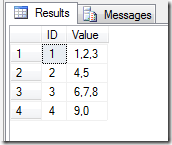
Download Source Files: Here I’ve seen a lot of post recently asking how can I search within a field of delimited values or join to a list of delimited values.  The truth is its very difficult.  The best approach is to turn that list of values from a rows into a columns. In this post I’m going to show you a table valued udf that will do that for you.

Quick Tip 005 – SSMS Using Templates

Image
I often find that not many people truly harness the power of SQL Server Management Studio (SSMS).  In the next few quick tips, I’m going to highlight some nice functionality that can help in your everyday use of SSMS. In this tip, I’m going to talk about Templates, how to use them, how to create your own and where on your system they are being stored.

Quick Tip 004 - SQL Row Constructors

Download Source Files: Here Another excellent addition to SQL Server 2008 was the introduction of the row or table constructors.  In this quick tip I’m going to illustrate how to use the row constructor inside INSERT and SELECT statements.

SCD Using MERGE and Table Data Types in SSIS - 2 of 2

Image
Download Source Files: Here As promised in my first post , I’ve now put together an new example of how to use the the SQL MERGE statement, along with new TABLE Data Type to upsert a dimension table in a data warehouse completely within data flow.  In the previous example I used the control flow along with and recordset object to illustrate how to pass the data into a stored proc, however the call to the stored procedure was in the control flow. In this post I will use a script destination component to call the stored proc.

Generate SSRS Reports in SSIS – Control Flow – 2 of 4

Image
Download Source Code: Here In the previous post Generate SSRS Reports in SSIS – The Report – 1 of 4 we developed an SSRS report that we will now call from within our SSIS package.  We will also continue to use the same solution files as we did in the first post.

Quick Tip 003 – Dynamic Pivot SQL

Image
Download Source Files: Here One of the frustrating things about using the SQL Server PIVOT function is that you need to explicitly name the field values that you want to be pivoted across the horizontal access of your result set.  The problem with this is that this list of values could change over time as new data is added to the database.  So what's the solution?  In this post I’ll demonstrate how you can create a stored proc that will take a SQL query, derive the unique values in a column and dynamically create the SQL necessary to generate PIVOT table based on these values.

Quick Tip 002 – High Performance Running Totals

Download Source Files: Here In this post I will illustrate a high performance method for calculating running total by traversing a table index. I’ve seen many example of people using sub queries and CROSS JOIN’s in order to accomplish the same thing, the only problem with these is the overhead of joining so many rows together.  In this example I’ll illustrate how to traverse an index and create a running total at the same time.